How to Send Retreaver Pings to CallScaler
Add a ping webhook to a Retreaver buyer that gets a live CallScaler bid and routes accepted calls to the returned number.
What you're building
Retreaver calls everything a webhook, but the kind you want here is a ping: a webhook on your buyer that fires while the call is being routed, asks CallScaler for a price, and gets back accepted, a bid, and a phone number. Retreaver applies the JSON reply to the call as tags automatically — no parsing configuration needed — and routes accepted calls to the returned number.
Retreaver's own reference is their webhooks guide (see Buyer Webhooks and ping triggers); the steps below are the plain-English CallScaler version.
Before you start
You need two values from your campaign — both are in the campaign approval email and on My Campaigns (open the campaign and hit API specs):
Network admins: open the publisher under Publishers and choose Download integration guide (PDF) from the ⋯ menu — a send-ready document with every campaign's credentials and this setup.
- •Endpoint URL —
https://…/api/v1/rtb/ping/<token>, unique per campaign. - •X-RTB-Secret — the header value that authenticates your pings.
Step 1 — Add a ping webhook
Edit the campaign (or the buyer), scroll to the Webhooks section, and click Add. Pick a trigger from the Ping (during call) group:
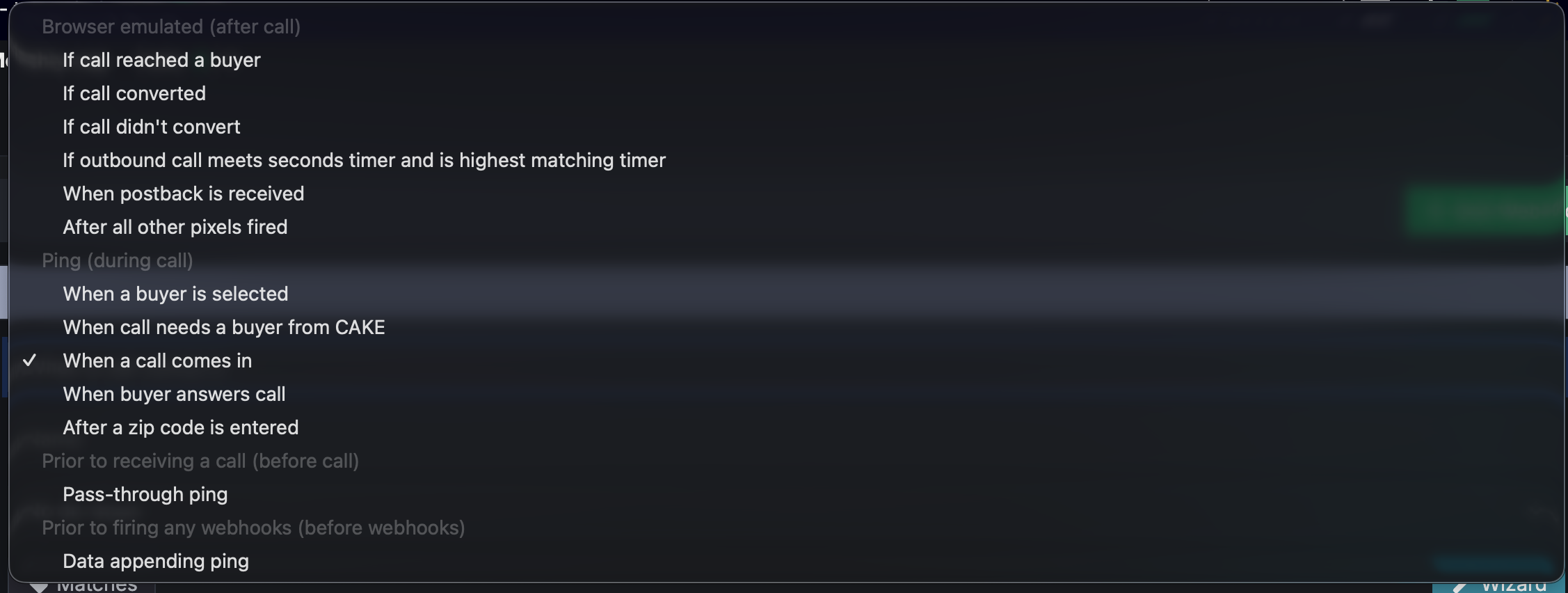
- •When a call comes in — use this when the caller's ZIP is already on the call (from your promo page or publisher postback).
- •After a zip code is entered — use this when you collect the ZIP in-call with a keypad prompt, so the ping fires once the ZIP exists.
Step 2 — The request
Configure the webhook to POST to the campaign's endpoint URL, with the caller and ZIP as parameters using Retreaver's replacement tokens (for example caller=[caller_number] plus your ZIP tag's token), and add a header: X-RTB-Secret with the campaign secret.
Field names are forgiving — caller_id, phone, zipcode, caller_zip and similar all work, and Retreaver's default JSON ping parses correctly out of the box (even with its unusual octet-stream content type). Most setups need zero field mapping.
Pings without a caller or ZIP are rejected (missing_caller / missing_zip). Retreaver webhooks time out after 5 seconds — CallScaler usually answers in under a second, worst case a few seconds when the campaign pings external bidders, so you're inside the window.
Test and verify
Every webhook card has a Test Fire Webhook button — use it to send a test ping and check the raw response before going live.

- •Pings are free — only routed, qualified calls move money. You can also use Send a test ping on the CallScaler campaign's API specs panel.
- •Every Retreaver ping appears in the campaign's ping log within seconds, including the reject reason:
bad_secret(header wrong or missing),missing_caller/missing_zip(field didn't arrive),campaign_inactive(ask your network contact). - •Before placing a real test call, register your phone as a test number in your publisher dashboard — calls from unregistered VoIP numbers are blocked as spam, and test-number calls connect without counting as a paid lead.
Related
On this page