Dashboard and Reporting
Use Overview and Call Log to monitor performance and review every call end to end.
Open the Overview Dashboard
1. Go to Overview.
2. Use the top date selector to switch between Today, Yesterday, Last 7 days, Last 30 days, This month, Last month, Last 90 days, This year, or a custom date range.
3. Add optional filters for Number, Call Flow, or Number Group to scope the dashboard to one segment.
4. Use Refresh in the Today card when you want an immediate pull instead of waiting for auto refresh.
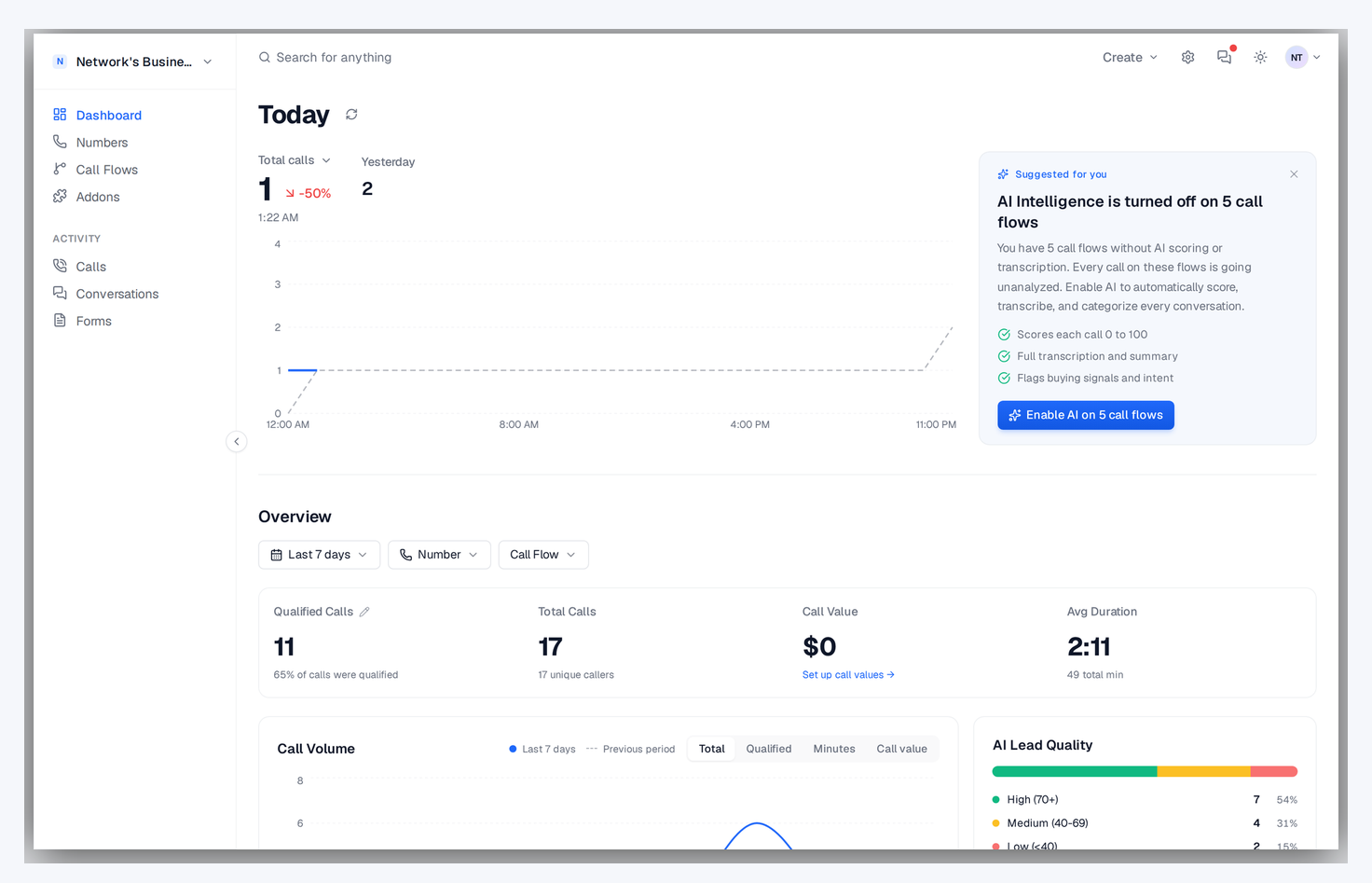
Understand the Main Metrics
Overview shows total calls, qualified calls, average duration, total minutes, unique callers, active numbers, and call value for the selected window. Each primary card includes a period-over-period change so you can spot trend direction quickly.
If you run multiple campaigns (for example Google Ads, Facebook, and SEO), apply filters one at a time to compare each source with the same date range.
Tune Your Qualified Call Rules
Qualified reporting on dashboard and call log follows the rule tree configured in Settings → Qualified call rules.
1. Open the rule builder and combine conditions on call duration, AI score, and call tags using ALL/ANY group matchers.
2. Save — dashboard qualified totals and qualified-only views update across reporting.
3. Use the thumbs up/down icon on any call to manually override the rule outcome when needed.
Viewers can see qualified results but cannot edit the rules. Owners, admins, and managers can update them.
Read the Charts and Breakdowns
The main chart shows calls, qualified calls, value, and duration over time for the active filters. Additional widgets break down performance by source, number group, top callers, peak hours, AI score distribution, and campaign performance so you can find where qualified calls come from.
Review Recent Calls from Overview
The Recent Activity panel shows the latest calls for the active filters. Click a call to open full detail, play the recording, and inspect transcription, AI summary, attribution, and call metadata without leaving the dashboard.
Work in Call Log
1. Go to Call Log.
2. Filter by date, status, direction, source, number, call flow, number group, duration range, and search terms.
3. Toggle Qualified to only show calls at or above your qualified threshold.
4. Click any row to open full call detail and recording playback.
Call Log refreshes automatically and also supports manual refresh if you're actively monitoring inbound traffic.
Customize and Export Call Log
Use Columns to show or hide table fields, then sort by date, duration, status, or AI score. Export downloads a CSV using your current filters, so you can send exactly the current slice to a client or internal report.
Review Voicemails
Voicemails show up in the Call Log as calls with a Voicemail status — there is no separate voicemails page. Filter the Call Log by the Voicemail status to see only messages, then click any row to play the recording and read the transcription if it was enabled on the call flow.
Calls that reached the destination's voicemail
When you forward a call and the phone on the other end sends it to its own voicemail, the carrier still reports the leg as answered. Historically that call showed as Answered in your log even though no human ever picked up, which quietly inflates your answered rate.
CallScaler now catches most of these: when the call was recorded and AI transcription is on, the AI pass recognises a voicemail pickup and the Call Log shows a purple Voicemail badge instead of Answered.
This is a display change only. The underlying call is still a completed call, so billing, Pay Per Call payouts, and your answered-call stats are unaffected.
Press 1 to Connect does not help here. It screens the caller before we dial out, so it cannot tell a human who answers apart from an answering machine. See Call Flow Settings.
Detection only runs on calls that were recorded and transcribed. If Record Calls or AI Transcription is off for a call flow, calls on it that hit the destination's voicemail still read as Answered — turn both on for the flows where this matters.
On this page