
TCPA Litigator and DNC Screening on Every Inbound Call

Screen every caller against a TCPA litigator or DNC database before the call connects, and hang up automatically on the ones it flags. Blacklist Alliance comes preset, and the step works with any screening service that returns JSON.

The bottom line

Last updated: August 2026

CallScaler's Caller Check step screens every inbound caller against a third-party TCPA litigator or DNC database before the call connects. Blacklist Alliance is preset and ready to use, and the step works with any screening provider that returns JSON. The lookup runs in the background, so clean callers are never delayed, and flagged callers are hung up before they reach an agent or a buyer. If the provider is slow or unreachable, the call continues normally, so screening can never cost you a good lead. The step is free on every plan and you bring your own account with the screening provider.

Curran Van Waarde
Written by Curran Van Waarde, Founder, CallScaler

Quick facts about TCPA & DNC Checker

Price
Free on every plan
Screening account
Bring your own (we do not resell lookups)
Preset provider
Blacklist Alliance, one click
Other providers
Any GET or POST API returning JSON
Added hold time
None, the lookup runs in the background
If the provider is down
The call continues (fails open)

In-depth guide to TCPA & DNC Checker

Why inbound calls need TCPA and DNC screening

Most screening happens on outbound dialing, but inbound pay-per-call traffic carries the same risk. Serial plaintiffs and litigators generate inbound calls on purpose, and a buyer who takes one of those calls will charge the cost back to whoever sent it. Screening at the call flow level moves that check in front of the transfer, so the risky caller never reaches the buyer, the agent, or the auction. This is a routing control, not legal advice, so pair it with whatever compliance program your counsel signs off on.
How the Caller Check step works

The step is deliberately simple to configure and hard to break:

  • The caller's number is sent to your screening provider the moment the flow reaches the step
  • Routing continues in parallel, so a clean caller hears no delay
  • A flagged response ends the call immediately and stamps the call log
  • Timeouts, errors, and missing fields let the call through instead of blocking it
  • Templates like {caller} and {caller10} fill in the caller's number in whichever format your provider expects

Setting it up with Blacklist Alliance

The preset covers the standard Blacklist Alliance lookup:

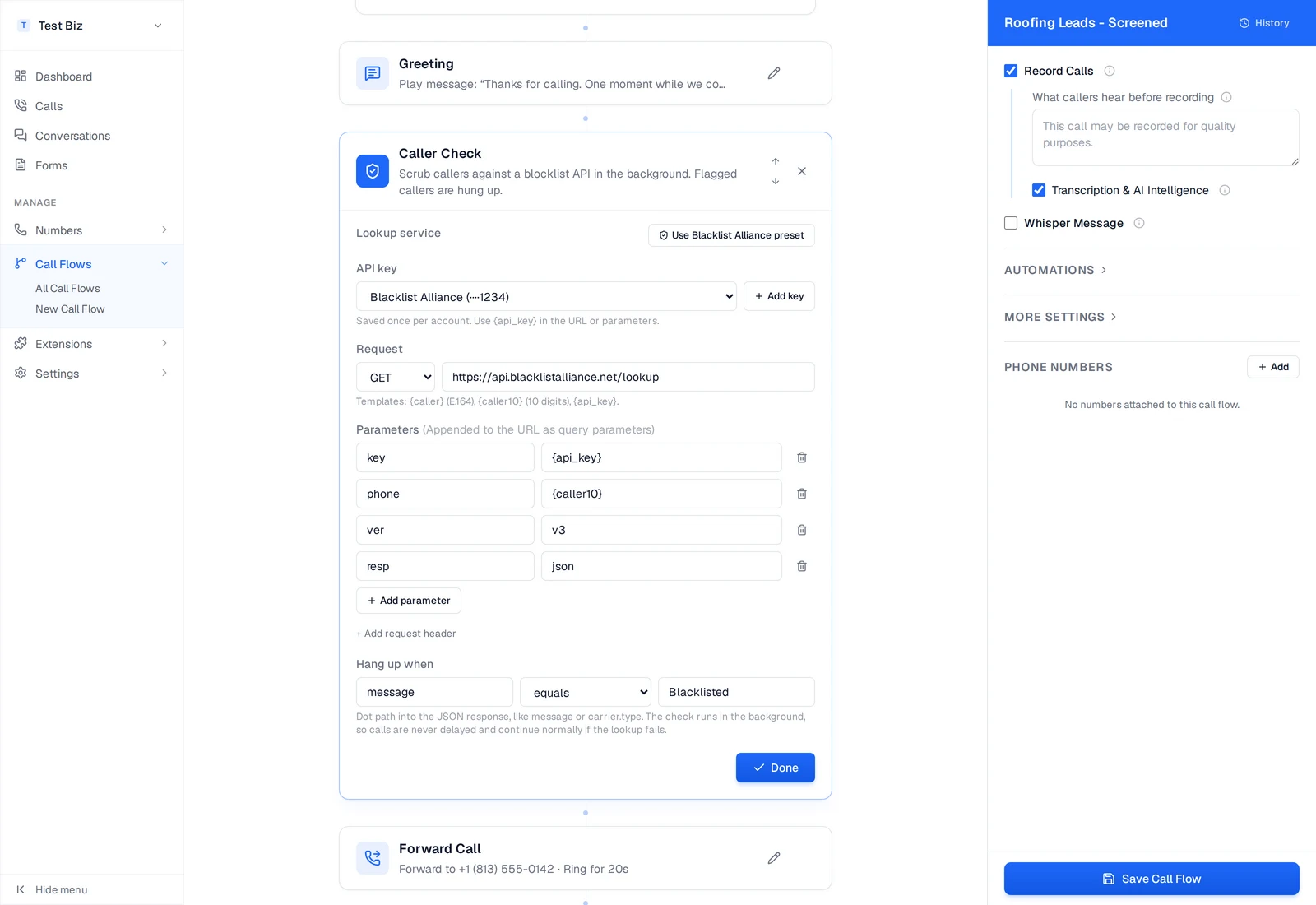
  • Add a Caller Check step and click Use Blacklist Alliance preset
  • Add your API key once, it is stored encrypted and reused across flows
  • The preset fills in the endpoint, the phone and key parameters, and the block rule
  • The default rule blocks when the response message equals Blacklisted
  • Place the step above your forward, multi-ring, or RTB step so screening happens before the transfer

Using a different screening provider

The step is provider-agnostic. Choose GET or POST, paste the lookup URL, and add whatever parameters your provider expects, using {caller} for the E.164 number, {caller10} for the 10-digit form, and {api_key} for your saved key. Then describe the block condition: a dot path into the JSON response, a comparison (equals, does not equal, contains, exists), and the value to match. That covers DNC scrubs, litigator lists, fraud scoring, carrier reputation APIs, and internal services your own team runs.

What happens to blocked calls

A flagged call is ended mid-flight and stamped on the call record, so it shows a Blocked badge in the call log and can be filtered with the Blocked status. On pay-per-call flows the call is also disqualified, which means no buyer is charged and no publisher payout is generated for it. Nothing is hidden: the call still appears in your log with its caller ID and timestamps so you can audit exactly what the screening provider flagged and how often.

Screening plus robocall blocking

TCPA and DNC screening answers a different question than robocall blocking. Robocall blocking asks whether the caller is a bot or a spammer, using STIR/SHAKEN attestation and behavioral scoring. TCPA and DNC screening asks whether this specific human is someone you are exposed to for calling or accepting calls from. Networks that care about traffic quality usually run both: robocall blocking to keep junk out, and Caller Check to keep litigators away from buyers.

How it works

Screen every caller in the background, before anyone picks up.

  1. Add the Caller Check Step

    Open any call flow, click Add Step, and drop Caller Check above the step that dials your destination.

  2. Save Your API Key

    Paste the API key from your screening provider once. It is encrypted at rest, masked to the last 4 digits, and reusable on every flow in your business.

  3. Pick the Block Rule

    Click the Blacklist Alliance preset, or enter your own lookup URL and parameters, then choose which response value means blocked.

  4. Calls Get Screened

    Every caller is checked while the flow keeps moving. Flagged callers are hung up and labeled in your call log. Everyone else connects with no delay.

Caller Check step open in the CallScaler call flow editor with the Blacklist Alliance preset, saved API key, lookup parameters, and the hang-up rule

Key capabilities

Keep litigators and DNC numbers out of your call flows and off your buyers' phones.

TCPA Litigator Screening

Check every caller against known litigator and serial-plaintiff lists before an agent or a buyer ever picks up.

DNC and Blocklist Checks

Run DNC scrubs, internal blocklists, and reputation lookups through the same step, using the provider you already pay for.

Blacklist Alliance Preset

One click fills in the Blacklist Alliance endpoint, parameters, and block rule. Add your API key and the step is live.

Any JSON Lookup API

Not on Blacklist Alliance? Point the step at any provider that answers with JSON over GET or POST, including your own internal service.

Zero Added Hold Time

The lookup runs in the background while the flow keeps moving, so clean callers never sit through an extra pause.

Encrypted Key Storage

API keys are encrypted at rest, shown only as the last 4 digits after saving, and shared across every flow in the business.

Who uses TCPA and DNC screening?

Anyone buying, selling, or working consumer phone leads.

  • Pay-per-call networks that owe buyers clean, litigation-free traffic
  • Lead gen advertisers whose buyers require a scrub on every transferred call
  • Home services, insurance, and legal advertisers exposed to serial plaintiffs
  • Agencies running paid campaigns where one litigator call can wipe out a month of margin

Frequently asked questions

Common questions about TCPA & DNC Checker.

Start tracking your calls today

Sign up free, set up in under 60 seconds. No credit card required.