Call Tracking Analytics Dashboard with Real-Time Attribution
See call volume, source attribution, lead quality trends, and conversion data all in real time. Custom date ranges, filters, and breakdowns help you make faster, smarter marketing decisions.
CallScaler's analytics dashboard shows call volume, source attribution, lead quality trends, and conversion data in real time. You can slice data by date range, source, campaign, lead score, and more, then export to CSV or share dashboard links with clients. Multi-business views let agencies see aggregate data or drill into individual clients. CallTrackingMetrics restricts advanced reporting to enterprise plans starting at $399 a month; CallScaler includes full analytics on every plan.
Written by Curran Van Waarde, Founder, CallScaler
Quick facts about Analytics Dashboard
Price
Free on every plan
Update cadence
Real-time (live aggregation)
Date ranges
Today, 7d, 30d, custom
Breakdowns
Source, campaign, number, AI score
Multi-business
Yes (one switcher)
Export
CSV per filter view
In-depth guide to Analytics Dashboard
What the dashboard tells you at a glance
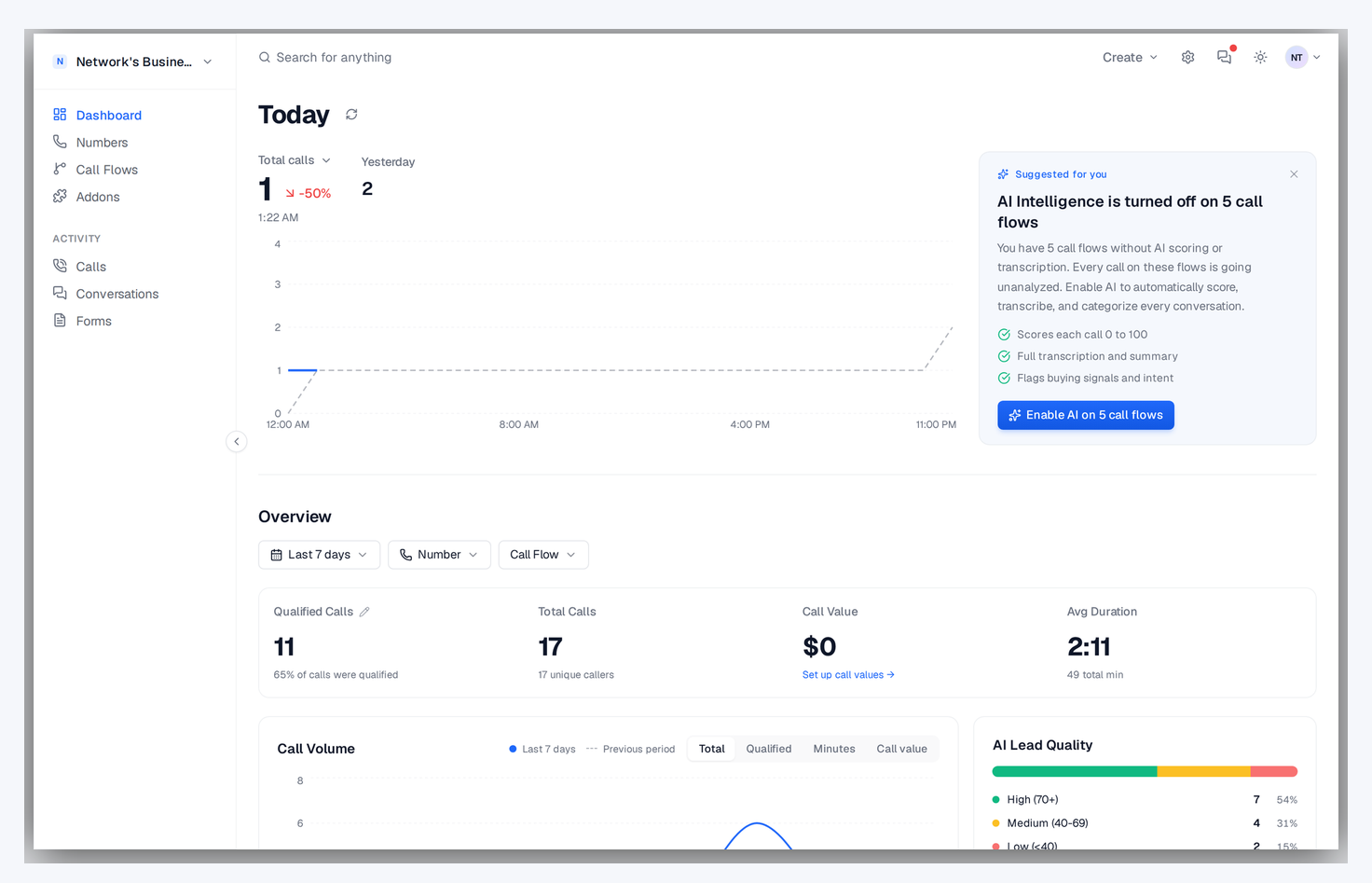
The CallScaler dashboard shows your key call metrics in real time: total calls, answered calls, missed calls, unique callers, and qualified leads. Each metric card shows the current value plus the trend compared to the previous period. The call volume chart lets you spot patterns by day of week and identify which days your campaigns perform best. Below the chart, recent calls appear with status badges so you can see what is happening right now.
Overview dashboard with Today card, 7d metric cards, Call Volume chart, and AI Lead Quality breakdown
Source attribution and campaign performance
The dashboard breaks down calls by traffic source so you can see how many calls came from Google Ads, Meta, organic search, direct, and any custom sources you track. You can drill into any source to see individual campaigns, ad groups, and keywords. This is the data you use to decide where to increase spend and where to cut. If your Google Ads calls convert at 3x the rate of your Facebook calls, you can reallocate budget with confidence.
Using filters to find insights
Filter the dashboard by date range, source, campaign, business, lead score, or call status. You can combine filters to answer specific questions. For example, show only qualified calls from Google Ads in the last 7 days, or show missed calls from toll-free numbers this month. Every chart and metric on the dashboard updates to reflect your active filters.
Dashboard for agencies

If you manage multiple clients, the multi-business switcher lets you view each client's dashboard independently or look at aggregate data across your portfolio. This makes it easy to create client-facing reports showing call volume, lead quality, and source performance without switching between accounts.
Business switcher dropdown listing every client workspace, with one-click navigation between them
Customizing your dashboard view
Make the dashboard work for your specific role:
Use date range presets (today, this week, this month, custom) for quick comparisons
Save filter combinations you use frequently for one-click access
Switch between businesses to see individual client performance
Export any filtered view to CSV for offline analysis or client reporting
Dashboard vs manual reporting
Before call tracking dashboards, marketing teams exported data from multiple sources, built spreadsheets, and spent hours creating reports. CallScaler's dashboard shows the same data in real time with no manual work. Source attribution, lead quality trends, and campaign performance are always up to date. When a client asks 'how are my campaigns doing?' you can answer in seconds instead of building a report.
Key metrics to monitor daily
Build a daily review habit around these dashboard metrics:
Total calls and unique callers, is volume trending up or down?
Answer rate, are you missing too many calls?
Average lead score, is traffic quality consistent or declining?
Top sources, which campaigns are driving the most calls today?
Missed calls, which leads need immediate callback follow-up?
Connecting dashboard data to ad platforms
The dashboard shows you which campaigns work. The ad platform integrations close the loop by feeding that data back. When you see a Google Ads campaign with a high average lead score on the dashboard, you know the integration is sending those qualified calls as conversions to Smart Bidding. The dashboard is your monitoring layer; the integrations are your optimization layer. Together, they create a feedback loop that improves campaign performance automatically.
How it works
From raw calls to actionable insights in real time.
01
Calls Flow In
Every inbound call is logged with source, duration, recording, transcript, AI score, and caller details.
02
Data Aggregated
CallScaler aggregates call data in real time. Dashboards update live as calls come in.
03
Filter & Analyze
Slice data by date range, source, campaign, lead score, duration, and more. Custom views for every use case.
04
Export & Share
Export reports to CSV, share dashboard links with clients, or push data to Google Sheets.
Dashboard with Today card, 7-day metric cards, call volume chart, and AI lead quality breakdown
Key capabilities
Slice your call data any way you need.
Real-Time Updates
Dashboard updates live as calls come in. No waiting, no manual refresh.
Advanced Filters
Filter by source, campaign, date range, lead score, duration, status, and custom tags.
Source Breakdown
Pie charts and bar graphs showing call volume by source, campaign, and landing page.
Trend Analysis
See call volume and lead quality trends over time. Spot patterns and anomalies.
CSV Export
Export any report or filtered view to CSV. Your data, your way.
Multi-Business Views
Switch between businesses or see aggregate data across your entire portfolio.
Analytics dashboards compared
Provider
Price
Real-time updates
Multi-business switcher
CSV export
CallScaler (every plan)
Free
Yes
Yes
Yes
CallRail (Marketing)
$95/mo
Yes
Add-on
Yes
WhatConverts (Pro)
$30/mo
Yes
Yes
Yes
CallTrackingMetrics (Enterprise)
$399/mo+ tier
Yes
Yes
Yes
Pricing as of May 2026. CallScaler is the only provider with multi-business switcher + real-time analytics on every plan.
Who uses the analytics dashboard?
Anyone who needs to understand call performance and marketing ROI.
Marketing managers tracking campaign performance in real time
Agency owners creating client reports with call data
Business owners monitoring daily call volume and lead quality
Operations teams tracking answer rates and response times